
Context Window in LLMs
It is the LLM's working memory.

I’m Amit Shekhar from Outcome School, where I teach AI and Machine Learning.
Let’s get started.
Context Window = LLM’s Working Memory
In simple words, the context window is the maximum amount of text an LLM can see and work with at one time.
Let’s say a student at Outcome School asks an AI tutor: “Explain RAG to me.” The LLM sees the course instructions, the full chat history, the question, and its own reply.
Course Instructions + Chat History + Question + Reply: All of this is the context window for that session.
Context Window is Measured in Tokens, Not Words
A token is roughly 3–4 characters or ~0.75 words. LLMs read token by token, not word by word.
So, 1,000 words ≈ 1,333 tokens.
For example, “Outcome School” broken into tokens:
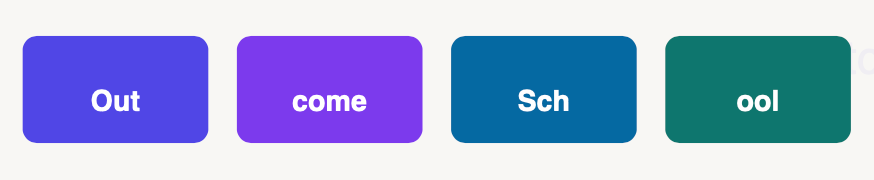
Out | come | Sch | ool → 4 tokens, not 2 words.
For reference:
~1,000 words = ~1,333 tokens
100K context window = ~75,000 words
Everything the LLM Sees Counts Toward the Limit
System Prompt: Your instructions to the LLM
Conversation History: All previous messages in the chat
User Message: The current question you are asking
Tool Results: Output from function calls or search
LLM Response: The reply the LLM generates
All of this counts. We must manage it wisely.
What Happens When We Exceed the Context Limit?
The LLM cannot process tokens beyond its limit. Different systems handle this differently:
API throws an error: Request fails. We must reduce input size.
Oldest messages get dropped: Chat history is silently truncated.
LLM loses context: It forgets earlier parts of the conversation.
Quality degrades: Answers become inconsistent or wrong.
How Big Are Context Windows Today?
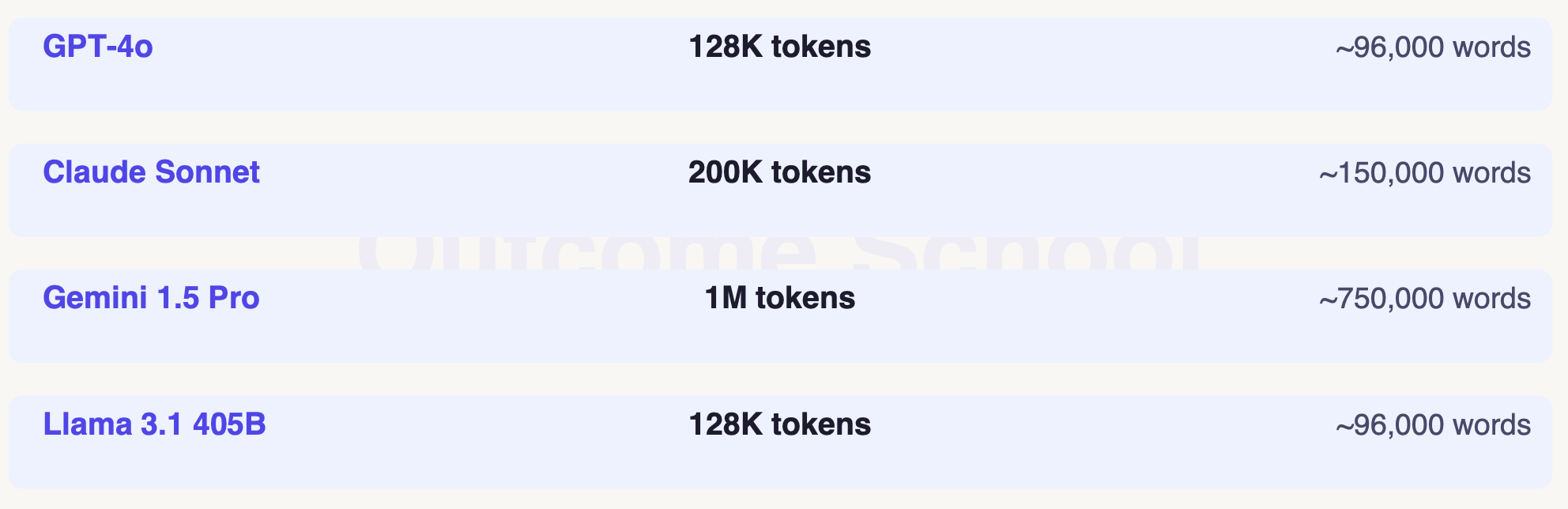
Bigger context = more information to the LLM.
But bigger also means slower and more costly.
How Do We Manage the Context Window Well?
Keep system prompts short and focused.
Summarize old chat history instead of keeping it all.
Use RAG to fetch only the relevant chunks - do not dump the full document.
Remove tool results once processed - they add up fast.
Monitor token usage per request to avoid surprises.
If you want to get the overview of LLM, RAG, MCP, Agent, Fine-tuning, and Quantization, refer to the AI Engineering Explained: LLM, RAG, MCP, Agent, Fine-Tuning, Quantization.
Context window = LLM’s working memory (in tokens).
Everything - prompt, history, reply - fits inside it.
Exceeding the limit causes errors or silent data loss.
Bigger context = more power, but also more cost.
That’s it for now.
Thanks
Amit Shekhar
Founder, Outcome School